


If your business relies on phone leads to keep the lights on, a significant shift in the Google Ads landscape is coming your way.
For years, Call Ads (formerly Call-Only Ads) have been the go-to strategy for service-based businesses like plumbers, tow trucks, and emergency services. These ads allowed users to call you directly from the search results without ever visiting a landing page.
However, Google recently announced that Call Ads are being deprecated. The new standard? Responsive Search Ads (RSAs) with Call Assets.
While “change” is often a scary word in digital marketing, this shift actually offers a major opportunity to improve your lead quality and lower your costs. Here is everything you need to know about the timeline, why this is happening, and exactly how to make the switch.
The Timeline: When is this Happening?
Google is phasing this out in two stages. we strongly recommend you don’t wait until the last minute. Transitioning now gives the algorithm time to learn and prevents a sudden drop in leads later.
- February 2026: You will no longer be able to create new call-only ads.
- February 2027: All existing call-only ads will stop running entirely.
The takeaway: If you are still running legacy Call-Only campaigns, you have a grace period, but the clock is ticking.
Why Google is Making the Switch
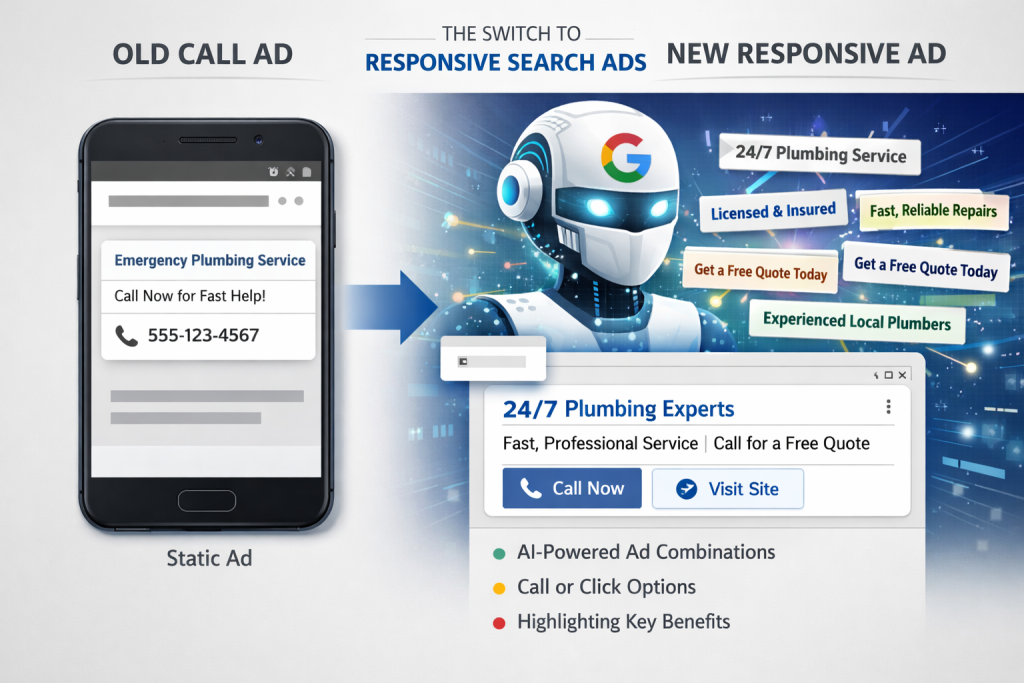
You might be asking, “If it ain’t broke, why fix it?” The old Call Ads were static. You wrote a headline, added a phone number, and that was it. The new method leverages Google AI to make your ads smarter.
- Better User Matching: RSAs mix and match up to 15 headlines and 4 descriptions to find the perfect message for each specific user.
- Flexibility: RSAs can do double duty. They can encourage a user to click to your website or call you directly, depending on what that specific user is most likely to do.
- Brand Attributes: You now have more real estate to highlight what makes you unique (e.g., “24/7 Service,” “Licensed & Insured”) while still keeping the phone number front and center.
Step-by-Step: How to Transition to RSAs
The good news is that setting up a Responsive Search Ad with a call asset is straightforward. Here is your transition plan:
Step 1: Audit Your Current Call Ads
Before you delete anything, look at your existing Call Ads. Which headlines had the highest Click-Through Rate (CTR)? Copy your best-performing text, you will want to use this in your new ads.
Step 2: Create a New Responsive Search Ad
Go to your campaign, click the + button, and select Responsive Search Ad.
Step 3: Input Your Headlines & Descriptions
This is where RSAs differ from the old format. You need to provide:
- Up to 15 Headlines: Use your best performers from Step 1, but add variations. Include clear calls to action like “Call for a Free Quote” or “Speak to an Expert.”
- Up to 4 Descriptions: Use this space to add details about your service, pricing, or guarantees.
Note: To maximize performance, try to fill out all available headline and description slots. This gives Google’s AI more options to test. Additionally, input your Final URL. Remember, unlike old Call Ads, RSAs require a link to your website.
Step 4: The Crucial Step – Add the Call Asset
This is the most important part. In the ad creation window (or under the “Assets” tab), find Call Assets.
- Add your business phone number here.
- Once added, this asset will appear alongside your text ad, functioning just like the old “Call” button did.
Clarify “Verification URL”
- If the phone number in the ad doesn’t match the number on the Final URL landing page, Google might disapprove of it.
- Ensure the phone number you use in the Call Asset is clearly visible on your landing page so Google can verify it.
Step 5: Review and Launch
Ensure your Conversion Tracking is set up to track “Calls from Ads.” Launch the new ad and let it run alongside your old ads for a few weeks to benchmark performance.
Best Practices for Maximizing Calls
If your primary goal is phone calls (not website clicks), you need to set up your RSAs differently than a standard e-commerce ad.
- Pin Your Headlines: If it is vital that users know they can call you immediately, you can “pin” a headline like “Call 24/7 for Service” to position 1 or 2. This ensures it always shows up.
- Schedule Your Ads: Use Ad Scheduling to ensure your call assets only appear when you have staff available to answer the phone. There is nothing worse than paying for a lead that goes to voicemail.
- Use “Call” Language: Even though these are text ads, your copy should still be aggressive about the call. Use phrases like “Talk to a technician now” rather than “Visit our website.”
Conclusion
The transition from Call Ads to Responsive Search Ads is mandatory, but it’s also an upgrade. By embracing RSAs, you are giving your business access to better machine learning and more flexible ad formats.
Your Action Plan: Audit your account this week. Try creating just one RSA with a call asset and run it against your old Call-Only ad. You might be surprised to see the new format winning sooner than you think.
Frequently Asked Questions
1. Can I still create ads that only allow people to call?
A: Technically, no. Unlike the old Call Ads, the new Responsive Search Ads (RSAs) must include a Final URL (a link to your website). This means a user could click your headline to visit your site rather than call.
- The Workaround: To prioritize calls, you should “pin” a call-focused headline (e.g., “Call Us Now”) to the top position and adjust your bidding strategy to maximize “Call” conversions. This signals to Google’s AI that the phone call is your most valuable outcome.
2. What happens to my historical data when Call Ads are removed?
A: You will not lose your data, but you will lose the ability to use it for active optimization. Your historical reports for old Call-Only campaigns will remain accessible in your account for analysis. However, since RSAs use a completely different algorithm, your new ads will need a “learning period” (usually 2–4 weeks) to build up their own performance history. This is why we recommend switching early.
3. Will my Cost Per Lead (CPL) go up?
A: It varies, but many advertisers actually see their costs decrease or stabilize over time.
- Why? Old Call-Only ads were often expensive because they competed for very limited mobile-only ad slots. RSAs are eligible for more inventory (across different devices and placements), which can lower your average Cost Per Click (CPC). While you might get some website clicks mixed in with your calls, the overall efficiency of the campaign often improves with Google’s AI optimization.